
Feature
Photo calorie counting: snap a meal, get an honest range
By Caleb King, founder of CoachhUpdated
Coachh counts calories from a photo: snap your plate in the chat and it logs the meal with an estimate of calories, protein, carbs and fat, shown as a range that gets wider when it's less sure. Add a note like "half of this" to tighten it, scan a barcode for a package's exact label numbers, and fix any meal by saying what changed.
How it works, step by step
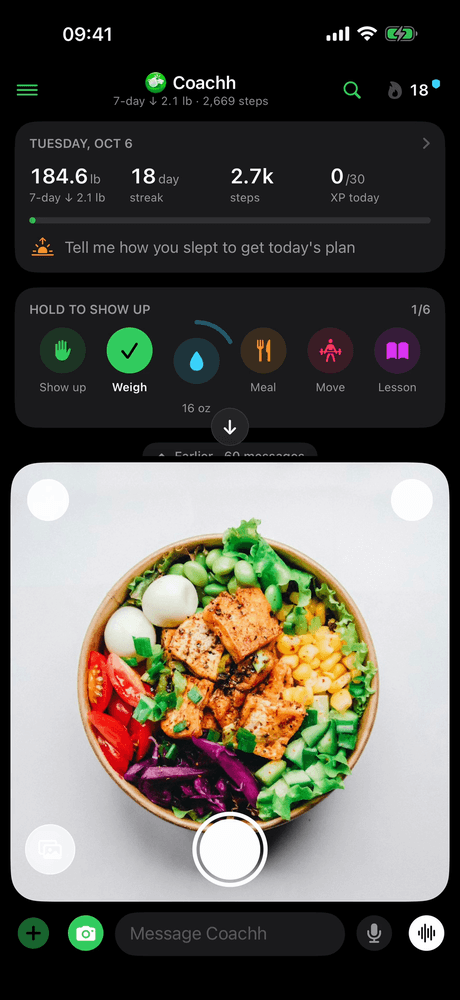
Step 1: Snap the plate
Tap the camera in the chat and take a photo of your meal. A photo you took earlier works too, and it's logged at the time it was taken, not the time you sent it.
Step 2: Get a range, not a made-up exact number
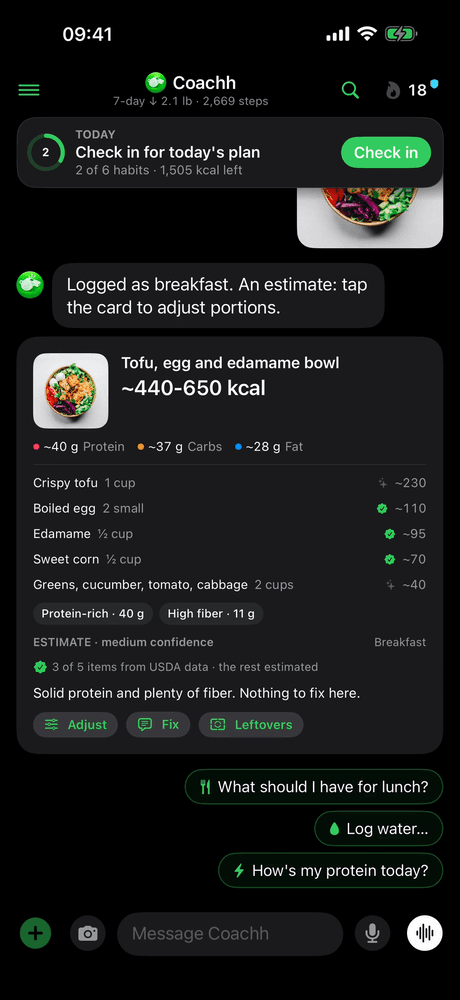
Coachh names what it sees, estimates each item's portion and logs the meal with calories, protein, carbs and fat. The total is shown as a range, the card is labelled as an estimate with how sure it is, and it says which items were matched to USDA nutrition data.
Step 3: Tighten it if you want to
When an estimate is less certain, Coachh asks one quick question. A note with the photo changes the estimate ("half of this", "no dressing"), and Adjust opens any item so you can change its portion.
Step 4: Confirm or fix it in plain words
Say "actually it was 2 eggs" and Coachh fixes that meal instead of logging another. Once you've corrected a food, it uses your numbers for that food next time. An estimated meal goes to Apple Health only after you say it looks right or fix it.
Step 5: Scan packaged food instead
For anything with a barcode, scan it: Coachh logs the package's exact numbers, not an estimate, and checks them first. If a product's calories don't add up from its protein, carbs and fat, it uses USDA's numbers when it has them, or asks you to check the label.
How accurate is photo calorie counting?
It's the roughest way to log a meal, in any app. A photo can't show the oil in the pan, the sauce under the rice or how densely a bowl is packed, so the portion is a judgment from what's visible.
Published tests agree. One 2025 benchmark, Benchmarking and Improving Foundation Model Dietary Estimates from Meal Images, found that a leading general-purpose model's calorie estimates were off by 34.6% on average on a research set of plated meals, and by 42.2% on ordinary smartphone photos. Knowing the food's weight cut the errors sharply. In our own tests, Coachh's photo estimates were several times further off than meals described in words with their amounts, and a barcode is as exact as the label.
That doesn't make photos useless. A rough number you actually log beats a perfect number you skip, and research on self-monitoring finds that how often people log matters (see how to count calories without logging every bite). It does mean a photo estimate should look like an estimate.
Why does Coachh show a range instead of one number?
Because one number would claim more than a photo can know. "About 440 to 650 kcal" is honest about the doubt; "537 kcal" isn't. The range is wider when Coachh is less sure, and every estimate is labelled as one.
The range also tells you when to spend ten more seconds. If it's wide and the meal matters to you, answer the one question Coachh asks, add a note, or open the item and set the portion. If it's narrow, move on.
Where the numbers come from matters too. Coachh matches the items it recognizes to USDA FoodData Central, the US government's food composition database, and the card says how many items it matched and which ones it estimated.
When should you scan, type or snap?
Use the quickest method that's honest for the food in front of you:
| Method | Best for | How exact |
|---|---|---|
| Barcode | Anything packaged | The label's own numbers, checked before they're logged |
| A sentence with amounts | Home cooking you can describe: "150 g chicken, a cup of rice" | Close, when the amounts are right |
| A photo | Restaurant plates, mixed dishes, busy days | A range, the roughest of the three |
| "My usual" | Meals you repeat | Your own numbers, once you've corrected them |
Barcode data comes from public product databases such as Open Food Facts, which is crowd-sourced. That's why Coachh checks a scanned product before logging it: a label typed in kilojoules instead of calories, or one serving's numbers typed as per 100 g, are common mistakes. A label you scan for a barcode no source has goes on Coachh's shared food list, so the next person's scan finds it.
What else can a meal photo do?
- Ask before you eat. A photo with "should I eat this?" is a question, not a meal: you get a straight answer, and nothing is logged until you say so.
- Leftovers. A photo of what's left updates the same meal to what you actually ate, so you don't log a plate twice.
- Late logging. A photo from earlier in the day lands at the time it was taken.
Photo estimates are one part of the food diary: the same diary takes sentences, barcodes and your usual meals, and your daily totals and the Sunday weekly review use all of them.
What it’s good at
- Logging a restaurant plate or a mixed dish in seconds, when typing it out would stop you logging at all.
- Being honest about doubt: every estimate is labelled as one and shown as a range.
- Getting closer over time: a food you've corrected uses your numbers the next time.
- Packaged food, by barcode: the label's exact numbers, checked before they're logged.
Honest limits
- A photo is the roughest way to log: hidden oil, sauces and dense portions are easy to miss.
- It estimates calories, protein, carbs and fat; there are no vitamin and mineral tables.
- Estimated meals reach Apple Health only after you confirm or fix them, so Health shows them later.
- There's no free tier: photo estimates come with Coachh Pro.
What does it cost?
Everything on this page comes with Coachh Pro, one subscription with everything in it: $119.99 a year or $19.99 a month (US prices). The yearly plan starts with a 7-day free trial; the monthly plan has no trial, and there’s no free tier. The full details, including how to cancel, are on the pricing page.
Compare apps and read more
Comparisons
Common questions
Can an app count calories from a picture?
Yes, as an estimate. Coachh names the foods it sees, estimates each portion and logs calories, protein, carbs and fat, shown as a range that's wider when it's less sure. A note or one quick question tightens it.
Is a photo calorie counter accurate enough to be useful?
For seeing roughly what you eat, yes; for exact numbers, no. Published tests found average errors of about 35 to 42% from photos alone, so treat a photo as a range and scan or describe food with amounts when precision matters.
Does Coachh have a barcode scanner?
Yes. A scanned barcode logs the package's exact label numbers, not an estimate. Coachh checks them first and uses USDA's numbers, or asks you to check the label, when a product's calories don't add up from its macros.
Can I fix a photo estimate?
Yes. Say what changed ("actually it was 2 eggs", "I only ate half"), or tap Adjust to change an item's portion. Coachh remembers your correction and uses your numbers for that food next time.
Do photo estimates go to Apple Health?
Only once you say the meal looks right or fix it, so Apple Health doesn't fill up with guesses. A barcode scan goes to Apple Health straight away, since its numbers come from the label.
Sources
- Benchmarking and Improving Foundation Model Dietary Estimates from Meal Images. ACM Conference on Bioinformatics, Computational Biology and Health Informatics (via PubMed Central), 2025.
- FoodData Central. U.S. Department of Agriculture, Agricultural Research Service.
- Open Food Facts. Open Food Facts.