
Feature
A calorie and workout app that works with Apple Health
By Caleb King, founder of CoachhUpdated
Coachh works with Apple Health on iPhone and Apple Watch, and with Health Connect on Android from November 2026. With your permission it reads steps, sleep, workouts, and weigh-ins and body fat from smart scales, and writes your workouts, weigh-ins, measurements, water and meals back. Estimated meals go to Health only once you confirm them; barcode scans go straight away.
How it works, step by step
Step 1: Choose what to share
Coachh asks for Apple Health access during setup, and you pick what it may read and write. You can change any of it later in iOS Settings; on Android, in Health Connect.
Step 2: Steps, sleep and workouts come in
Your step goal starts near what you already walk. A walk you record in Apple's Workout app shows up in the chat and keeps your streak, once. A run recorded on your Watch or in Strava counts toward today's planned run; a walk doesn't. Last night's sleep feeds the morning plan.
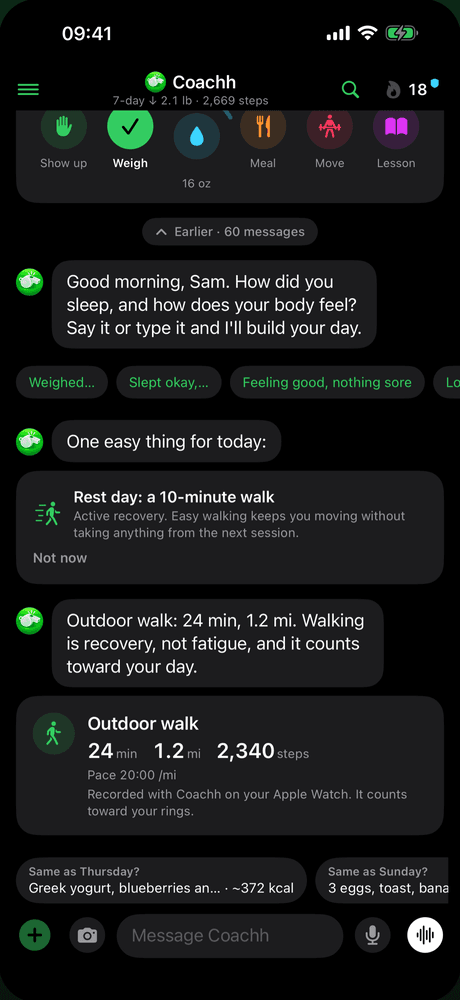
Step 3: Your scale's weigh-ins come in once
If your smart scale writes to Apple Health, each weigh-in comes into Coachh once and counts for today, with body fat when the scale measures it. No typing, and no duplicates.
Step 4: Your logs go back to Health
Workouts (written once, even when the Watch recorded them), weigh-ins, waist and body-fat measurements, water and meal nutrition go to Apple Health. A barcode scan goes straight away; an estimated meal waits until you say it looks right or fix it.
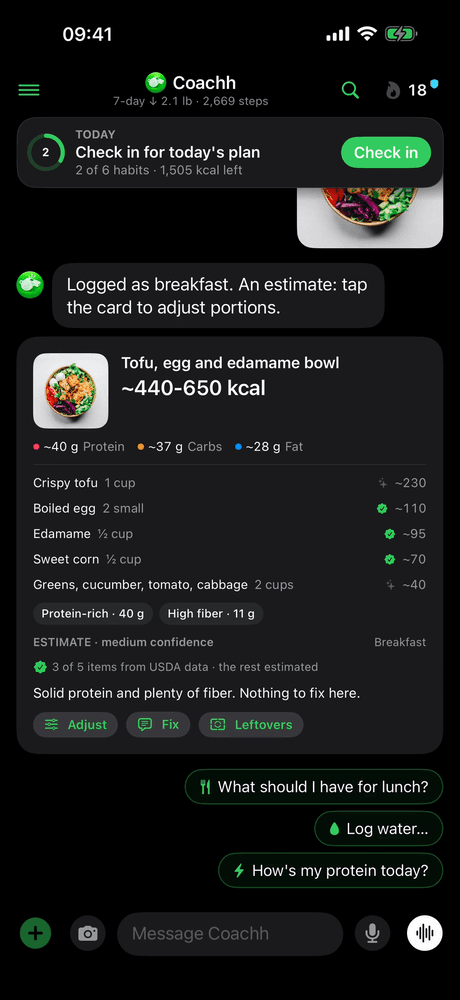
Step 5: Deletes stay in sync
Delete a weigh-in, a glass of water, a measurement or a workout in Coachh and it comes out of Apple Health too, so the two never disagree.
What does Coachh read from and write to Apple Health?
Only what you allow, and only what it uses:
| Data | Read from Apple Health | Written to Apple Health |
|---|---|---|
| Steps | Yes: your step goal and today's steps, hour by hour | No |
| Sleep | Yes: for the morning plan; sleep stages stay on your phone | No |
| Workouts | Yes: walks, runs and workouts other apps record | Yes: every Coachh workout, once |
| Weight | Yes: weigh-ins from smart scales | Yes: every weigh-in, in pounds or kilograms |
| Body fat | Yes: from smart scales, at most one reading a day saved | Yes: body-fat measurements |
| Waist | No | Yes |
| Water | No | Yes |
| Meals | No | Yes: barcode scans at once, estimates once you confirm them |
Coachh also reads heart data, such as heart rate variability, for the daily readiness that shapes your plan; heart-rate samples stay on your phone. The complete list, and what's uploaded to your account, is in our privacy policy.
Because Coachh doesn't read meals other apps wrote to Health, a food history from MyFitnessPal or another app won't come across. Your weigh-ins, workouts and steps will.
Why do estimated meals wait for you?
So Apple Health doesn't fill up with guesses. A photo or a sentence is an estimate, and Coachh shows it as one, often as a range. Once you tap that it looks right, or fix it ("actually it was 2 eggs"), the meal goes to Health with your numbers. A barcode's numbers come from the label, so a scanned product goes straight away. More on how estimates work: photo calorie counting.
Does Coachh work with Health Connect on Android?
Yes, from Coachh's Android launch in November 2026, with the same rules. It reads steps, sleep, workouts and smart-scale weigh-ins from Health Connect, and writes workouts, walks recorded on your watch, weigh-ins, body fat, water and meal nutrition back. Health Connect has no type for waist measurements, so those stay in Coachh.
There's no Wear OS app yet, so on Android your watch's workouts reach Coachh through Health Connect. If you want an Android option for your training app today, our Ladder alternatives page covers several.
Is your health data private?
Coachh has no ads, and never sells your data or uses Apple Health or Health Connect data for advertising or marketing. Health data is read on your phone; Coachh uploads daily totals, weigh-ins, body-fat readings and workout summaries, not raw samples. Usage analytics never carry weights, food or anything you typed.
If you delete your Coachh account, your account, logs and chat are deleted, and what's already in Apple Health stays there, where you control it. You can also export everything from the app first.
What it’s good at
- Smart-scale weigh-ins and Watch workouts without typing a thing.
- Keeping Apple Health clean: estimated meals wait for you, and nothing is written twice.
- Deleting in one place deletes in both.
- Counting runs and walks from other apps toward your plan and your streak.
Honest limits
- It can only see what other apps write to Health: a scale or tracker that doesn't sync with Apple Health or Health Connect won't show up.
- It doesn't read food other apps logged, so your old food diary doesn't come across.
- It uses sleep and heart data to shape today's plan; it isn't a sleep or heart-rate analysis app.
- Android and Health Connect arrive in November 2026, without a Wear OS app at first.
What does it cost?
Everything on this page comes with Coachh Pro, one subscription with everything in it: $119.99 a year or $19.99 a month (US prices). The yearly plan starts with a 7-day free trial; the monthly plan has no trial, and there’s no free tier. The full details, including how to cancel, are on the pricing page.
Compare apps and read more
Comparisons
Guides
Common questions
Is there a calorie counter that works with Apple Health?
Yes. Coachh writes your meals' nutrition to Apple Health (barcode scans straight away, estimates once you confirm them), along with workouts, weigh-ins, measurements and water, and reads steps, sleep, workouts and smart-scale weigh-ins.
Does Coachh read my Apple Watch workouts?
Yes. A walk you record in Apple's Workout app shows up in the Coachh chat and keeps your streak, and a run from your Watch or Strava counts toward today's planned run. Workouts you do in Coachh's own Watch app are written to Apple Health once.
Does Coachh work with my smart scale?
Yes, if the scale writes to Apple Health or Health Connect. Each weigh-in comes in once and counts for today, with body fat when the scale measures it.
Does Coachh work without Apple Health?
Yes. You can tell it everything instead: "weighed 184", "walked 30 minutes", "slept badly". Connecting Apple Health just means less typing.
What happens to my Apple Health data if I delete my Coachh account?
Coachh deletes your account, logs and chat. Anything it already saved to Apple Health stays there, under your control in the Health app.