
Feature
Strength training on Apple Watch: log every set from your wrist
By Caleb King, founder of CoachhUpdated
Coachh's Apple Watch app runs your strength workout from your wrist: start today's session, set the weight and reps with the Digital Crown, tap Done, and the rest timer starts. The Watch and your iPhone stay in step both ways, sets you log while they've lost each other are kept, and finishing saves one workout to Apple Health.
How it works, step by step
Step 1: Start from today's plan
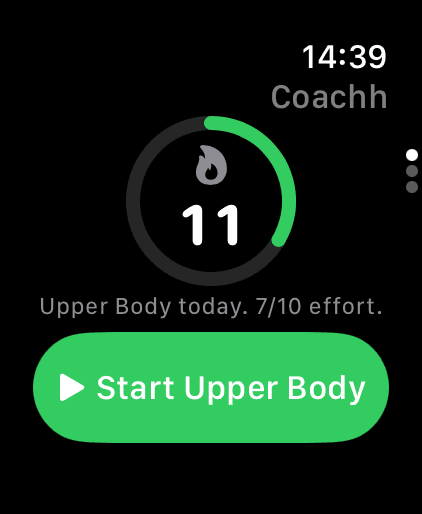
The Watch's first screen shows your streak and today's session. Start it there and the session starts on your iPhone too, or tap Start on Apple Watch from the plan on your phone and it opens on your wrist.
Step 2: Set the weight and reps, tap Done
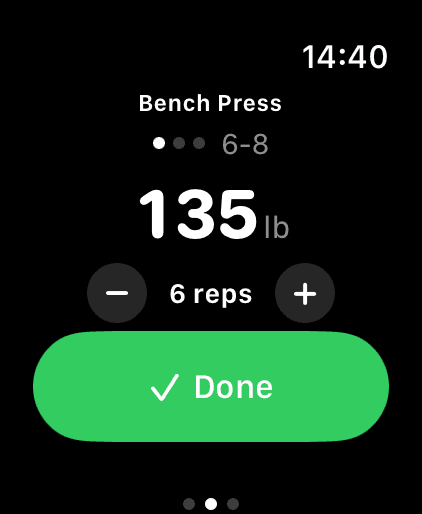
The Watch shows the same set as the phone: the exercise, the target reps and the weight. Turn the Digital Crown to change the weight or reps, then tap Done, and the set is logged on the phone with those numbers.
Step 3: Rest, rate it, repeat
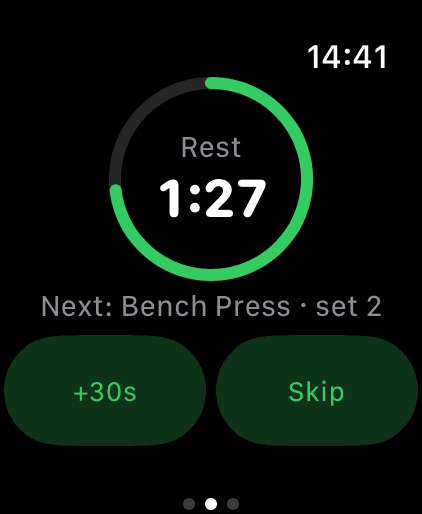
The rest timer runs on your wrist, with the next set underneath; skip it or add time, and the phone's timer changes too. Easy, Good or Hard adjusts the next set, just as it does on the phone, and Skip set moves straight on.
Step 4: See what's next
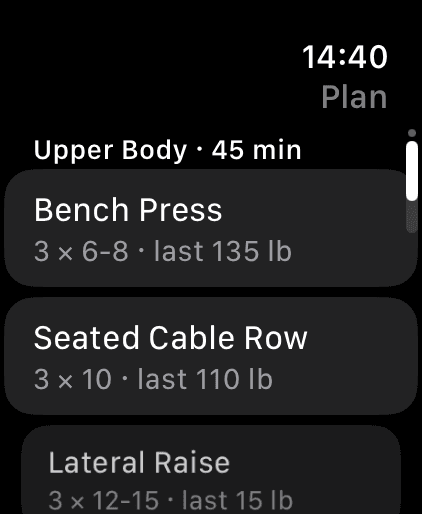
Swipe to the plan for the whole session, with the weight you used last time on each exercise. Intervals, EMOM and AMRAP sessions run on the Watch too, with the phone's blocks and heart-rate zones.
Step 5: Finish once, saved once
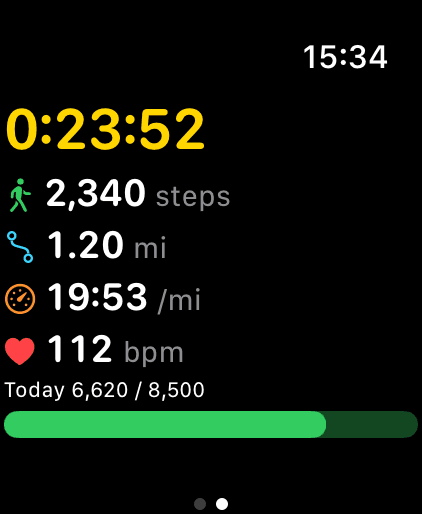
Finish on either device and one workout is saved, posted to the chat with a summary and written to Apple Health once. Walks you record on the Watch are posted with their summary too, and count toward your rings.
What makes a good Apple Watch app for lifting?
Three things: logging a set takes one tap, the weight is already right, and nothing gets lost when the phone and the Watch lose touch. The last one matters more than it sounds. In our October 2026 read of 6,500 App Store reviews, 23.6% of the 1–3 star reviews of training apps were about Apple Watch or Health sync.
Here's how Coachh handles each part:
- One tap per set. The weight and reps are filled in, from last time or from your plan. Turn the Digital Crown only when you need to change them.
- Both ways, live. What you change on the phone shows on the Watch straight away, and Done, Skip set, skip rest and added rest on the Watch change the phone's session.
- Nothing logged twice. Done tapped on both the phone and the Watch logs the set once. A workout the Watch finished while the phone's app was closed doesn't open again, and Apple Health gets one workout, not two.
- Nothing dropped. Taps on the Watch before the phone's workout is open are kept. If the Watch didn't save a workout, the phone does.
Does the Watch app work without your iPhone?
It's built to work with your iPhone, not instead of it. The workout runs on the phone, and the Watch mirrors it and drives it. If the two lose each other mid-workout, for example when the phone is in a locker, the Watch keeps going: sets you log are kept and sync when they meet again. If both logged the same set differently while apart, the phone's numbers are kept.
So keep your phone in the gym with you, in a pocket or a bag. If you want a Watch app that logs a whole workout with the phone left at home, a dedicated log app may suit you better; Hevy alternatives compares the main ones, including Strong.
How does it compare with Hevy, Strong and Ladder on the Watch?
As of October 2026, from each company's own pages: Hevy's Apple Watch app syncs live with the phone, tracks heart rate and saves on reconnect; Strong has a full Apple Watch app that logs on its own; and Ladder has an Apple Watch app alongside in-ear coaching, demos and a timer. Our comparisons have the details and dated prices: Hevy alternatives and Ladder alternatives.
What's different in Coachh is what the Watch runs. It isn't only a log: the session on your wrist is the one Coachh wrote for you, already adjusted for how you slept, and a heavier lift than ever before is called out as a personal record when you log it. Your heart rate from the Watch shows on the phone's player during the workout.
What else does the Watch do?
- Walks and runs. A walk you finish on the Watch is posted to the chat with its summary and counted once; a run recorded on the Watch counts toward today's planned run.
- Your day at a glance. The Watch gets today's plan and your latest weight, and its widgets show today's steps, step goal, streak and week.
- Phone extras while you train. On the iPhone's lock screen, the workout's Live Activity has buttons to log the set, add rest and skip.
New to Coachh's plans? See how Coachh writes and adjusts workout plans.
What it’s good at
- One tap per set, with the weight and reps already filled in and the Digital Crown to change them.
- Keeping the phone and the Watch in step both ways, live.
- Never logging a set or a workout twice, and keeping sets logged while they're apart.
- Running the plan Coachh wrote for you, adjusted for today, not just a blank log.
Honest limits
- It works with your iPhone rather than on its own: keep the phone with you at the gym.
- There's no Wear OS app yet; on Android, from November 2026, workouts your watch saves to Health Connect come into Coachh.
- Watch set logging is new: it ships with Coachh 1.0 on October 27, 2026.
- There's no free tier: the Watch app comes with Coachh Pro.
What does it cost?
Everything on this page comes with Coachh Pro, one subscription with everything in it: $119.99 a year or $19.99 a month (US prices). The yearly plan starts with a 7-day free trial; the monthly plan has no trial, and there’s no free tier. The full details, including how to cancel, are on the pricing page.
Compare apps and read more
Comparisons
Guides
Common questions
What's the best Apple Watch app for logging strength workouts?
It depends on how you train. Coachh suits people who want the plan written and adjusted for them, with every set logged from the wrist. Strong suits people who want the Watch to log on its own, and Hevy people who want a free log with a social feed.
Can I log sets on Apple Watch without my iPhone?
For a short while. Coachh's Watch app mirrors the workout running on your iPhone; if they lose each other, sets you log on the Watch are kept and sync when they reconnect. Keep the phone in the gym with you.
Does Coachh show my heart rate while I lift?
Yes. Your heart rate from the Watch shows on the phone's workout player, interval sessions run with heart-rate zones, and the finished workout is saved to Apple Health once.
Do Coachh workouts count toward my Apple Watch rings?
Yes. Workouts and walks you finish on the Watch are saved to Apple Health and count toward your rings, and they're posted to the chat with a summary.
Do I need an Apple Watch to use Coachh?
No. Everything works on iPhone alone, including the workout player with voice logging ("185 for 6"). The Watch app is there if you'd rather log from your wrist.